According to Official Google Blog:
At Google, we have a saying: “launch early and iterate.” While this approach is usually limited to our engineers, it apparently applies to our mailroom as well! As you may have read in the blogosphere, we hit "send" a bit early on a comic book introducing our new open source browser, Google Chrome.
As we believe in access to information for everyone, we've now made the comic publicly available -- you can find it here. We will be launching the beta version of Google Chrome tomorrow in more than 100 countries.
....This is just the beginning -- Google Chrome is far from done. We're releasing this beta for Windows to start the broader discussion and hear from you as quickly as possible. We're hard at work building versions for Mac and Linux too, and will continue to make it even faster and more robust. Read the full article at Official Google Blog!!
- World rejoice to the latest offering from our favorite search engine!! An internet web browser! This will definitely be the latest hurdle that Google need to clear for developing useful web software such as Google lively that encountered several errors using different browsers and operating system.
However, web programmers like me and my colleagues are dreading the prospect of requirement to support yet another web browser. Old websites programmed using old programming languages might not look the same or may not even function properly....
but obviously Google have the resource to actually fix the problems given their almost unlimited budget unlike the "other" browser.
Update: After viewing a comic from Google explaining more about the new Google Chrome web browser, I am extremely pleased that Google had include "Gears" that allow developers be able to develop web application that can be cross-platform to other browsers as well.
This means less headache supporting websites designed on Google Chrome and it's a full open sourced web browser makes it easier for other browsers to implement similar ideas.
Lets hope that Google can deliver yet another powerful software that can empower everyone that uses the internet!
I am seriously excited with the new browsers no doubt there might be bugs on the initial release but I seriously believe it will be resolved very quickly.

Latest Update on the solution HERE!! (06 October 2008)
I had been recently bothered by frequent DC and low then advertised speed of 10Mbps as advertised by Singnet Broad Band using the 10Mbps 3 year plan.
The DC problem is more prevalent in the new operating system Ubuntu Fiesty but when I dual boot to Microsoft XP the DC happen 2 times at mid-night. The 5 led lights just black out and restarted...
I had seen people in other forums using the same Singnet Broad Band 10Mbps Unlimited getting impressive speedtest.net results and showing all to see. So thinking I had been ripped off for paying almost $100 for 10Mbps Ultimate line but only get maximum 6Mbps...so I decided to call Singtel for assistance...
I had called the Singtel hot line and asked to call the technical help line. First person I get is a "Chinese" trying to speak English properly. He insisted me to follow the instruction line by line to test my speed.
Going through a series of "commands" using command prompt and connecting directly to Singnet (ftp) and downloading a 10meg file. The speed is claim to be optimum using the download speed there and MULTIPLY BY 8. Not sure why but the person says it's ok...no problem.
Not convinced I told him that using the speedtest.net I can only get maximum 6.5Mbps which is lower then the acceptable 70% range of 10Mbps. He then request me to go to singtel website and proceed to remote assistance.
After coming into my computer and seeking around the website and tested the speedtest.net himself to find it's truly not up to the advertised speed of 10Mbps which is after 1 hour of consultation....he say he will recommend to send a lines man down to test the line for me...but the schedule for the whole week is booked. He requested me to call on Friday to book for the next week schedule.
The following Friday, I called on schedule and I was reluctantly push into another round of TEST of the SAME LINE BY LINE instructions even I had told him that the previous guy had already tested it and recommended for the lines man to come....so after 1 hour of repeated consultation...and remote assistance to my PC. He agreed to send down a guy just to come and see my connection is it faulty.
The guy came slightly late today but I don't fault him, he came and went saying that the modem is near his age and need firmware updates. He claim he don't even know how to update the firmware even he did update his own "2wire" modem.
So my internet speed remains 6.5Mbps maximum and the recommendations are EITHER to update my modem firmware, buy new Linksys 2+ modem or exchange with Thomson a new modem but don't know if still under guarantee.
The lines man did very good job trying to talk me into accepting the fact that it's normal to get less then 10Mbps which I agreed but deep down inside I knew that I had been cheated.
The day when I had signed up this 3 years Singnet Broad Band 10Mbps Unlimited with free 1st Generation Macbook, I knew my payment of $100.26 ($83.80 for BroadBand 10Mbps Unlimited and $9.90 for Wireless Plus and GST $6.56) per month is way above the average cost of the connection which now is $69.29 for 24 months contract.
Now...how do I upgrade the firmware....let me see...
Ok...I had tried to upgrade my firmware of my Thomson Speedtouch 585v6 and it's a long and hard troubleshooting. My friend did successfully upgrade his Modem of the same model hence telling me the way to do it.
- go to the unofficial firmware download page for Thomson Speedtouch to download the latests firmware.
- Rename the firmware filename's extension from .bli into .bin
- Download the latest upgrade wizard (v4.4.2.1) here.
The easiest way to get the newer ST516/536/546/580/585 routers into bootp state is to do the following: It is helpful though not essential to have the pc with a fixed static ip.
- Begin with the unit powered off via the power switch at the back depressed.
- Get a pin or a pen with a long enough nose to reach the reset button and hold it in.
- Continue holding your pin or... on the reset button and do not release it. Power the unit on by pressing the power button into the "on" state never releasing the reset.
- Hold the reset button in for around 15 seconds. The power and Ethernet light should flash between red and green.
- Run the SpeedTouch firmware upgrade wizard. You only have around 1min to start the wizard before the speedtouch will revert to the normal boot up
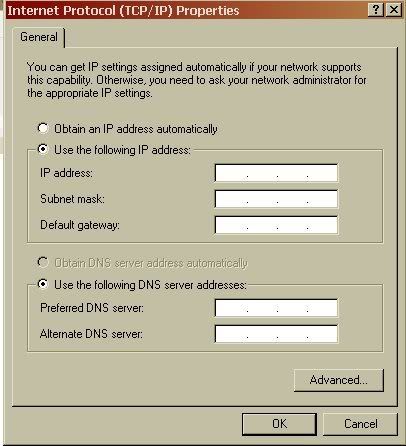 Note: It is always recommended to run the SpeedTouch firmware upgrade wizards with a statically set IP address on your PC of the following:
IP: 10.0.0.1, Subnet: 255.0.0.0, Default Gateway: 10.0.0.138.
Note: It is best to have all security programmes (firewalls, antivirus) either disabled or turned completely off. (Edit from Revs. It is absolutely essential not just best. The worst product is Symantec internet security because people don't know it is on. Turn everything symantec off (permanently would be best!!).
After updating the firmware, go to the internet browser and type in in the address : 10.0.0.138 and you can see the Speedtouch default page.
 Then go to first link on the left "SpeedTouch" and click on "Setup" and follow the instructions to put in your user name and password to reset-up the router modem.
After doing this, the last LED light on the modem will turn from red to yellowish green and you can put the TCP/IP address back to "Obtain the IP Address Automatically" and you can now surf internet. :)
And there I have it...I had upgraded my Speedtouch 585v6 Modem however when I tried the same speedtest.net and get the SAME SPEED after all the troubles hahahahaha....but I believe updating the firmware is the smart way to go....to eliminate any more excuses the technical help desk can throw at me in future haha....
Latest Update on the solution HERE!! (06 October 2008)
Google quietly launches their new google Docs's ability to create presentation easily over the internet anywhere in the world!
This also means you can actually present the presentation online by sharing your file with others!
I haven't really fully test it yet but the simple 5 minute test did show that it can produce simple basic presentation document easily!
Try it and see for yourself!
I had just had a good hang out with my friends yesterday night talking about many things such as Peak Oil and energy crisis...poking around with the supernatural here and there as it's the 7th Month of the Hungry Ghost Festival.
My friend Chee Xiong drove us (Manny, Mon and me) to Orchard road while Chee Xiong explains to us about the past histories of many scary locations in the area. On how one location near Orchard are used to be a cemetery for rich Chinese previously and how the MRT was built with many problems only to be resolved by burning offerings to the dead.
The mysterious night out ends by poking around about the future of Singapore and some ideas on how to improve the future.
Then comes my friend told me one key to secure a good living is to avoid telling everyone all my ideas and quote it as "Trade Secret".
This keyword for not revealing too much according to him is the key to be successful in businesses. There are business opportunities everywhere around us and only a slight improvements to the products and services compared to the competitors might prove to be a good venture or investment.
The things we purchase willingly will be the things that can sell easily, things that we cannot do without are too good businesses. Demand fuel supply, when there is a need in certain products there will always fast and efficient businessman to fill the supply. The problems is how to predict the next demand?
I will not reveal it as it's considered "Trade Secret"!!! (Psst...Internet have all the answers!)